Finding your way around
Sign in at console.nthlabs.dev. Home, Readiness, Findings and People sit at the top of the left side, and the rest come in four groups:
| Group | What is in it |
|---|---|
| Testing | Departments and Runs. |
| Departments | IT, Marketing and Finance, each with a dot and a count of what is open. |
| Forecast | Lab and Report. Folded until your first run has finished. |
| More | Brain and Usage. Folded until you open it. |
Settings is at the bottom. Above the list are Projects, every product on your account, and the product you are working on: click its name to switch. Search (⌘K) finds a screen, a finding or an action by name, and New run, top right, starts a check. Press ? for every keyboard shortcut.
Home
Home shows where the product stands and the one thing to do next. The title counts the issues between you and launch, and a verdict sits under it: Not checked, Not yet: fix first, Not yet, or Ready to launch. Check again checks the product again.
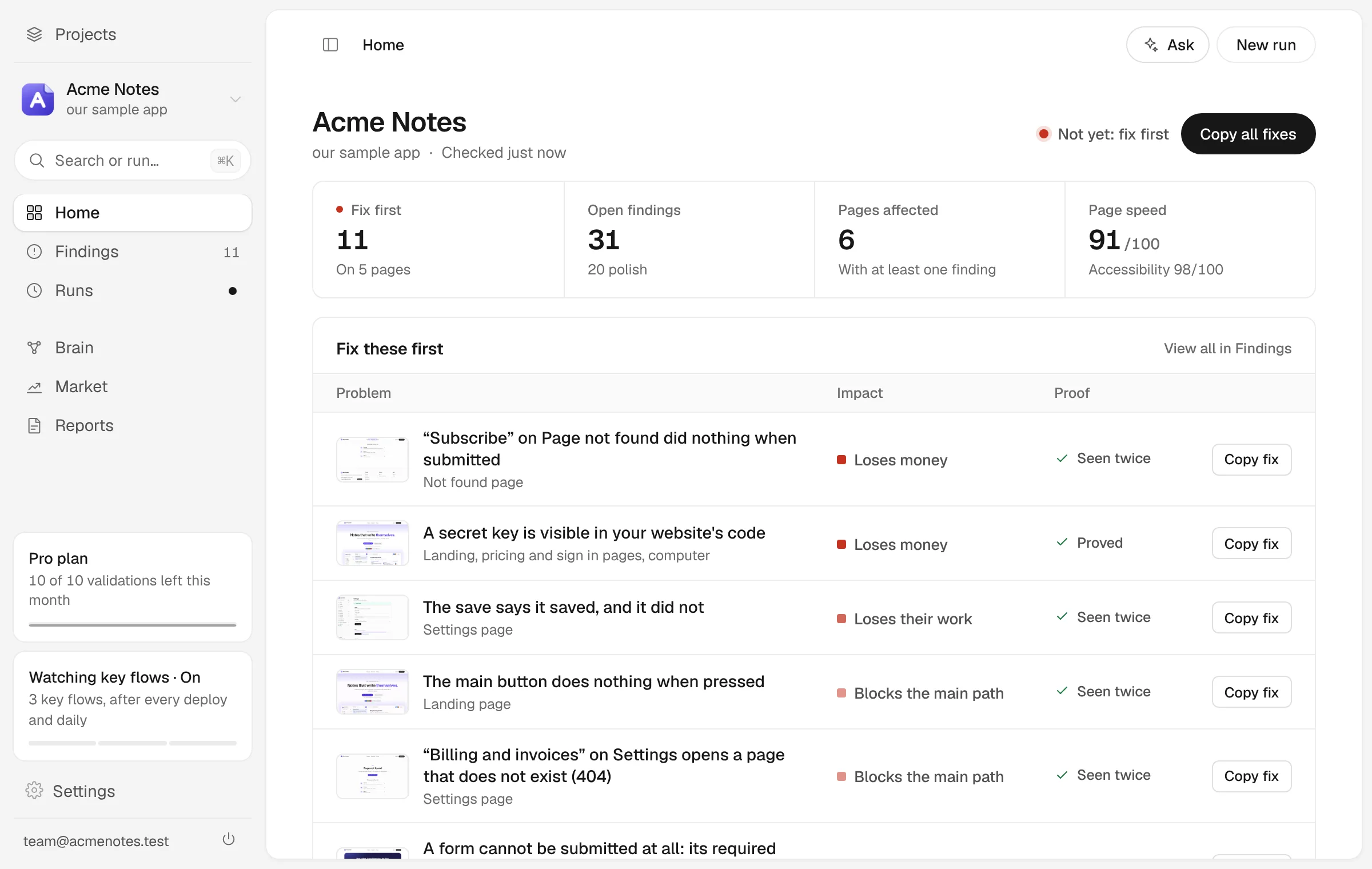
Next comes the top issue: what it is, the page it is on, the proof it carries, and two buttons, Copy fix prompt and View replay. Below it are the headline numbers (open issues, how many are blocking, runs, how much of the list a browser can verify and, on a paid plan, how many validations are left this month), the Readiness card, Top fixes, recent activity, Caught before your users (every regression stopped before it reached anyone) and Coverage (how much of your product the runs reach).
Readiness
Four questions decide whether the product is worth launching: does it work, who is it for, would they use it, and could it make money. Each gets a card, and the line under the title says how many of the four are measured so far. If nothing has measured an answer yet, its card says so instead of guessing.
Check now runs the checks named on the line beside it. The free checks cost nothing. The simulated buyers and the walks through your product are a validation, which comes with a paid plan (Free includes one full check with AI each month). Under the cards, Drop-off by step shows where people leave and which problems cause it, and Team to-dos lists what each department should do next.
Findings
Findings lists everything open, worst first. It is your work list. The numbers across the top (Any, Ship-blocking, Worth fixing, Polish) are filters too. The Review button, which carries the count (Review 12 findings, say), takes you through the new ones one at a time, and Copy fix-all prompt copies a single prompt with every open fix for your coding tool.
The list is split, so a proved defect never sits beside a guess at the same weight:
- Needs your eye: a model judged these and nothing has proved them yet. Accept or decline each one.
- What is not working: nth Labs used the product and these did not do what they said.
- Standards and hygiene: accessibility rules, console errors, broken links and headers. Folded unless one of them is ship-blocking.
- What a tester thought: opinions from the simulated testers, in their own words. Nothing here was proved by a browser.
A new finding waits for your answer. Press 1 to accept it, 2 to mark it a duplicate, 3 to decline it with a reason, H to snooze it and X to pick several at once. The … menu switches between Open, New, Snoozed, Declined, All, Resolved and Kept, and between the List, Table and By page views. Your verdicts says what each answer does.
Opening a finding
Click a row and the finding opens beside the list, so you keep your place. The pane shows what the browser saw, a summary, the steps it took, How do I fix it? with Copy fix prompt, and a Status list. Three buttons sit under it: Fixed? Verify it, Not a problem and Later. More holds the rest: Real problem and Won’t fix, Keep watching this (when a browser can repeat the steps), Copy as issue, Mark resolved and Drop.
People
People shows the simulated people behind every share: who each one is, what they did and why. The page leads with the answer (who would pay, who left and the top reason), then groups everyone who left by what they said, with their own words beside it. Filter by outcome, reason, job, age, device or place, or open Outcome by group to compare a group with the whole panel.
Open a person to follow their visit step by step. Panel seats and walkthrough users can be asked a follow-up in the Ask them box. Everyone here is simulated, and every share is a range rather than a single number.
Each simulated person’s answer is a model call, so seating them needs a paid plan. Until someone is seated, Test everything runs the free checks, and seats the panel when your plan allows it.
Departments
Findings are grouped into three departments, each answering one question:
| Department | The question | What it covers |
|---|---|---|
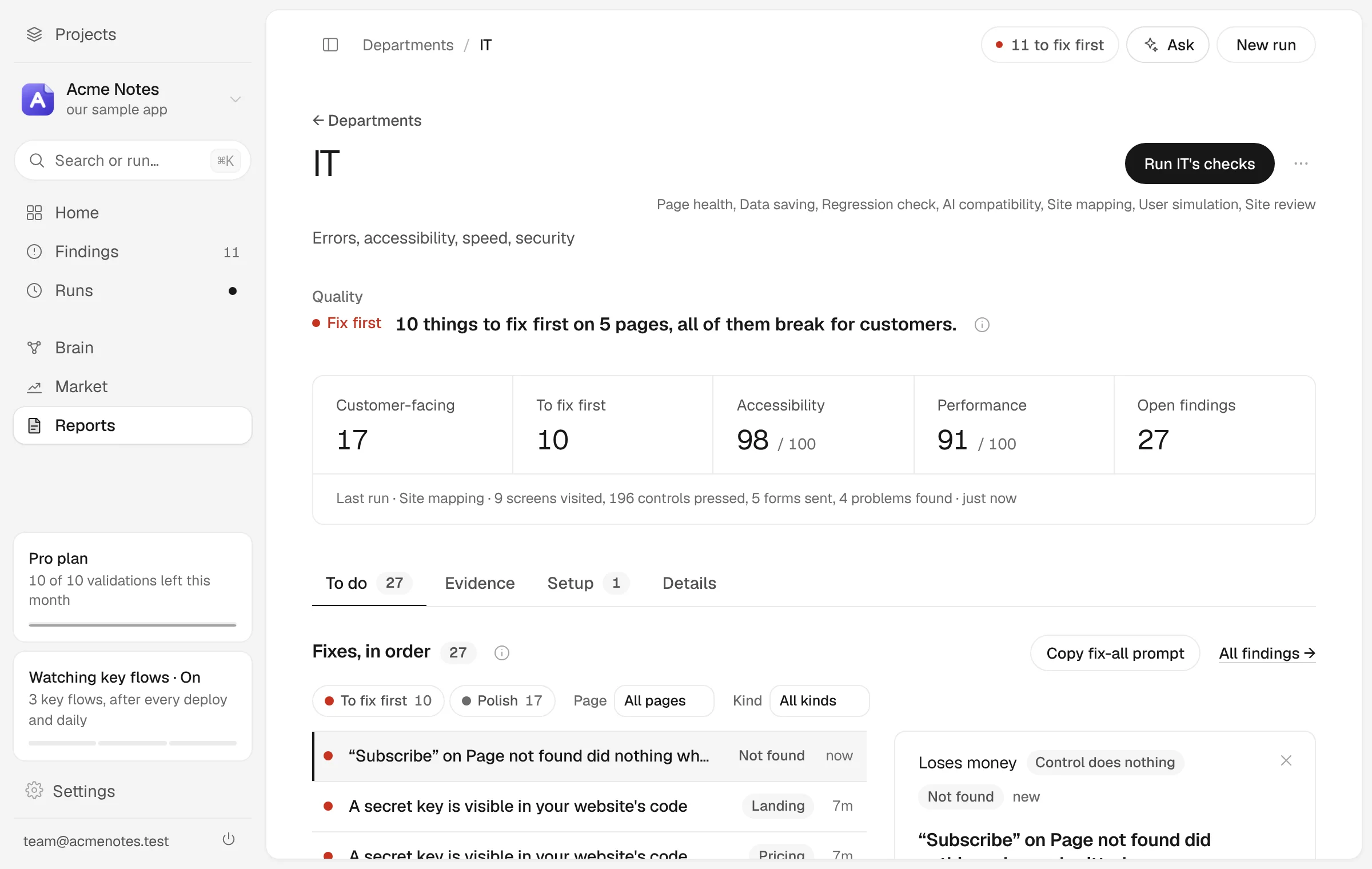
| IT | Does it actually work? | Errors, accessibility, speed, security |
| Marketing | Does the pitch land? | Claims, proof, who tries, what stops them |
| Finance | Will anyone pay, and what could it make? | Price, who would pay, what it could make |
The Departments board shows all three with their counts and what to fix first. Open one from the board, or from its row on the left. A department’s page leads with its answer in one line over its numbers, a button that runs its checks (Run IT’s checks, for example), and four tabs: To do, Evidence, Setup and Details.
Runs
Every check that has run, newest first. Each row shows the check, its result, whether it was free or used AI and how many model calls it made, what it found (ship-blocking, worth fixing, polish), its score and when it ran. The figures across the top count the runs, the model calls and the runs that used AI. Run again repeats it on the same product. Open a row for its Report and its Replay, the frames the browser captured as it went.
A run that failed or was stopped stays on the list, marked no report, instead of disappearing. On a console you run yourself, each row names the model and what the run cost instead.
Lab
The Lab is a model of your business, not a measurement of it. Change any assumption, such as what you charge or how many of the people who look end up buying, and the forecast moves with it. The year is drawn as the band that simulated outcomes land in, not as one number, and every dial says where its value came from.
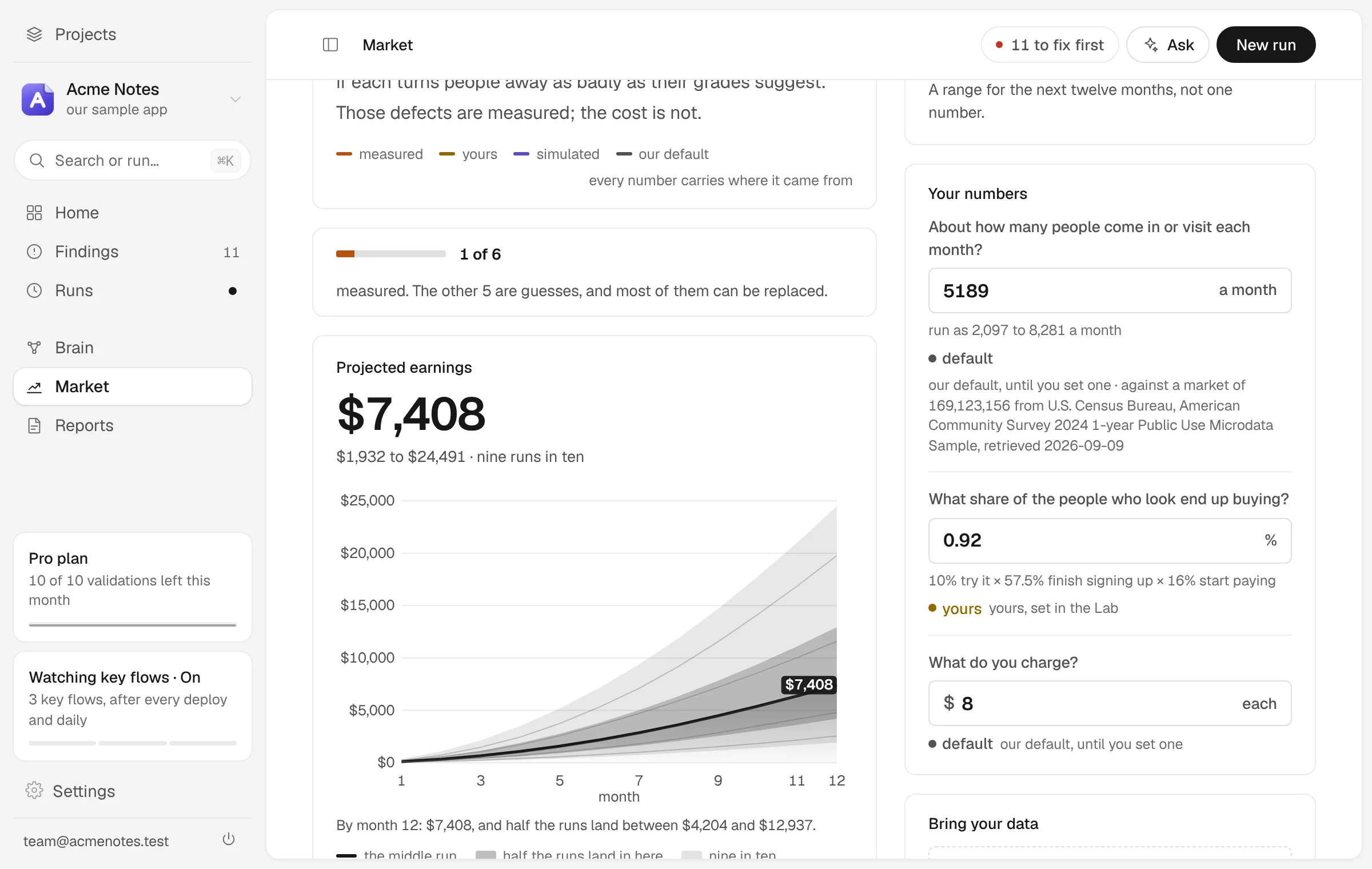
Drag the chart to set a target, and the Lab works out what would have to be true to reach it. Keep this to compare against saves the version you are looking at. Bring your data takes a sales export or a funnel as a CSV, TSV or Excel file; the file is read in the page, and nothing is uploaded.
Report
One document rolled up from every run: what changed since last time, what is open, what is likely fixed, and the next moves. Print it (or save it as a PDF from the print dialog), download it as Markdown, or Share a read-only link; how long a link can last depends on your plan. Regenerate writes it again from the latest runs. Report has the details.
Brain
Everything nth Labs has learned about your product, linked and dated: every screen, finding, simulated person and note, with where each fact came from. Search it, ask it a question, or read it as notes, a graph or a list of changes. Brain and memory covers it.
Usage
How much of your plan your runs have used, counted the way the plan is sold. On a paid plan it opens with how many validations are left this month, of about how many, and when they start again, with any top-up credit counted in validations too. Below that, for all time or the last 7 or 30 days: the runs that used AI and the model calls they made, runs per day, the same by check, and every run in a list you can export as a spreadsheet. Free checks never draw on your plan and never appear here.
On a console you run yourself, Usage shows what the runs cost instead, at the model’s list price, by check and by model.
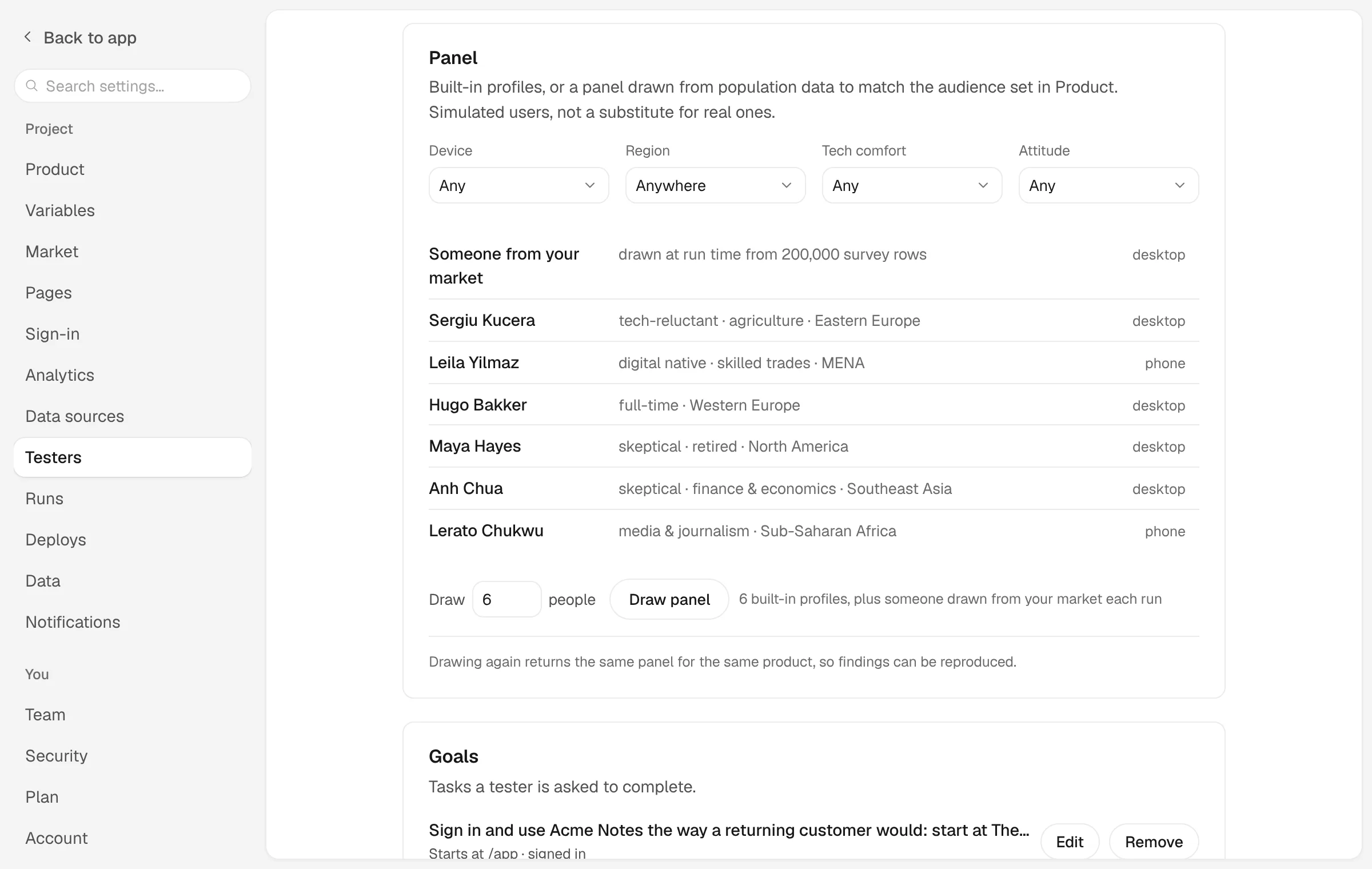
Settings
Settings has its own list down the left, and Back to app returns you to where you were. Search settings finds a setting by what it does, such as “password” or “dark mode”.
| Setting | What it holds |
|---|---|
| Product | The product under test, and what every agent is told about it. |
| Variables | Values your runs need to reach your product, such as a preview bypass secret. The AI is included in your plan. |
| Market | Where you sell and who buys. |
| Pages | The pages a run can visit. Scan the site, or list them by hand. |
| Sign-in | The test account testers sign in with. |
| Analytics and Data sources | What real visitors do, and your real numbers: payments, analytics and spreadsheets. |
| Testers | Who tests the product, and what they are asked to do. |
| Runs | Devices, how much each run tests, and schedules. |
| Deploys | A deploy webhook, Slack alerts and pull request checks. |
| Data | Share links, badges and export. |
| Notifications | The weekly digest: what changed, where it goes, and when. |
| Team, Plan and Account | Who else can see the workspace, what you pay, and your password, email and sessions. |
| Preferences | Appearance and notifications for this browser. |
| Coding tools | Tokens for Claude Code, Cursor, Codex and other MCP clients. |