How a session works
At each step the tester sees a screenshot of the page and the controls that are on it, thinks aloud in character, and picks the next move: click, type, scroll, go back, or leave. The session ends when they reach their goal, give up, or stop finding new screens. What a tester will not do:
- Press a control that is not on the page. If a tester names one that does not exist, it is refused.
- Pay for anything, or go through checkout, on your live product.
- Do anything that cannot be undone, on any product: no deleting the account or everything in it, no changing the sign-in details, no signing out.
- Wander off your site. A click that leaves it is brought straight back, and the tester is told.
- Create an account on a live product. A tester who arrives as a new visitor stops at your sign-up page; to test past it, run signed in.
Starting one
Open New run, then Change what runs, and pick User simulation under A single check. User simulation also runs inside IT’s and Finance’s checks. The run screen asks:
- Who is testing. Auto lets nth Labs pick one person for this run. You can pick someone yourself, several people, or Everyone.
- Give them a task. Free roam sends them in with no goal. To give them one, pick a goal you set in Settings, Testers. A goal with a proof (text that appears on screen when it is done) is judged by whether that text appeared. Without one, what comes back is the tester’s own account of whether it worked.
- Signed in? A new visitor starts at your home page. Signed in uses the test account from Settings, Sign-in and tests the pages behind your sign-in.
- How many screens? A ceiling, up to 30. The session still stops early once it stops finding new screens, so a tester walking in circles does not use up your plan.
Where the testers come from
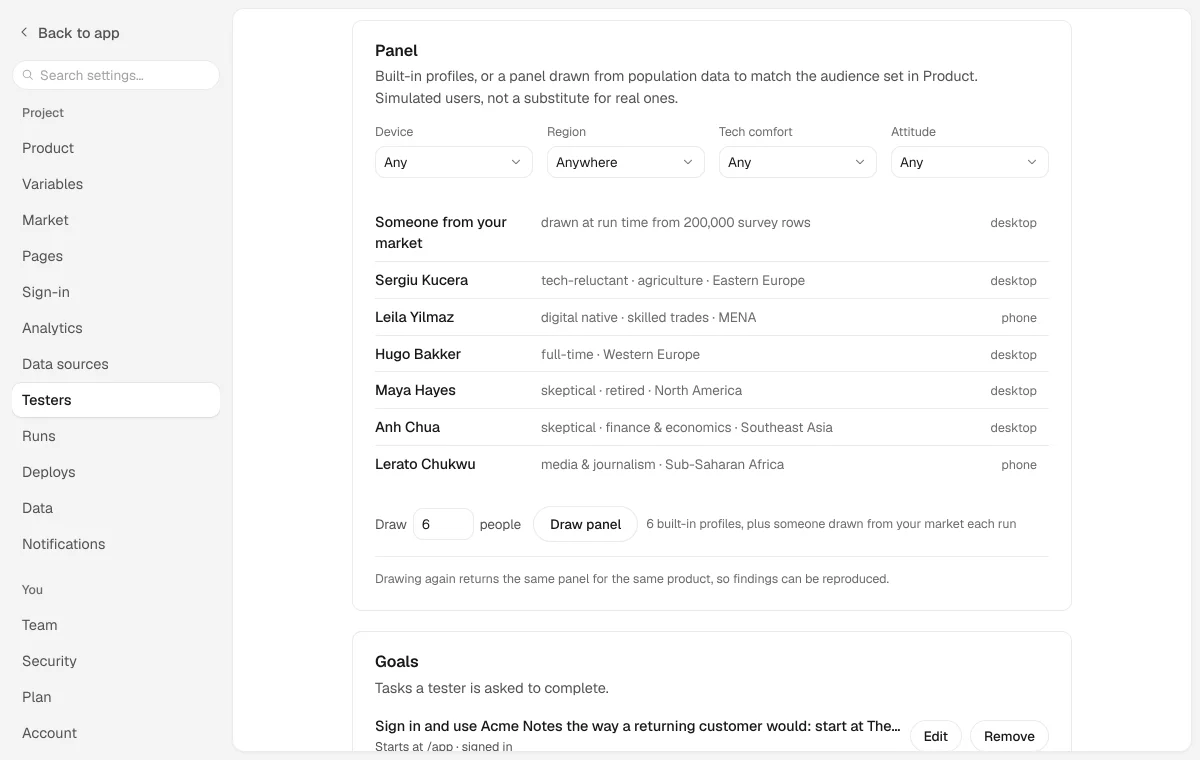
Testers come from a research dataset rather than from characters we wrote. The default panel is six people drawn from the MatrAIx Persona population, which is released under the MIT licence. Each has their own device, comfort with technology, trust, language and patience. Ethnicity, religion, marital status and gender are removed before the data reaches nth Labs. The same product always draws the same panel, so a finding can be reproduced.
In Settings, Testers you can narrow the draw by device, region, comfort with technology and attitude, draw again, and save a panel to reuse so results compare across runs. When nth Labs holds survey data for the market you declared, the first person under Who is testing is someone drawn from that market, a different person each run, and Auto picks them.
Simulated testers are for exploring and do not replace real people. They can find a step that does not work, but they cannot tell you whether anyone wanted to take it.
Several testers at once
Pick more than one person and they roam at the same time, each in their own browser. Then nth Labs reads the sessions side by side:
- Shared friction. A problem that two or more testers hit outranks any one tester’s complaint, and the finding names who hit it.
- Where they split. What one tester liked and another gave up on.
- A read per segment. Which kind of visitor the product wins, loses or leaves undecided, and on which screen.
A problem only one tester hit makes the list only if it is serious on its own. Treat a segment verdict as a lead to follow up rather than a statistic. A handful of simulated people can find obstacles but cannot measure rates.
Where the results appear
- Findings, each with the tester’s own words as evidence and a fix prompt. A screen they could not understand or use goes to IT. A tester ready to buy who got stuck on the way goes to Finance.
- Runs, where the session’s report holds the whole think-aloud, and the Replay tab steps through the frames the tester saw.
- Brain, which keeps a list of where testers gave up, across every session so far.
User simulation and a validation
User simulation finds where people get stuck. A validation asks a different question, who would use the product: a panel of simulated buyers reacts to your pages, and walkthrough users drawn from survey data about your market each try one task in the product. Their answers fill in the Readiness page, and those people appear on the People page. User simulation’s testers do not. See free checks and validations.
What it costs
User simulation runs on nth Labs’ AI and needs a paid plan. Each step a tester takes is one call, so a longer session or a bigger panel uses more of your plan’s monthly fair use. Usage, under More, shows how many model calls each session made. Send one tester first to see what comes back, then a panel.
From the command line
If you run nth Labs yourself from the repository, User simulation uses the AI key set on your machine:
node cli.cjs wander                        # one tester, free roam
node cli.cjs wander --signed-in            # past your sign-in, with the test account
node cli.cjs wander --mission <goal-id>    # one of your goals
node cli.cjs wander --steps 20             # a higher ceiling, still stopping early
node cli.cjs wander --personas assistant   # an AI assistant that reads the page structure, not pixels
node cli.cjs focus --panel 6               # six testers at once, then the cross-read