Where you see the results
You rarely need to start it yourself. Page health is part of the Quick check that runs the first time you press Check now, and every press after that measures your pages again. IT’s checks, Finance’s checks and Full check run it too.
- Home leads with the one finding to fix first, whichever check filed it.
- Findings lists everything it filed. Each finding names the page, says what the browser saw and carries a fix prompt for your coding tool.
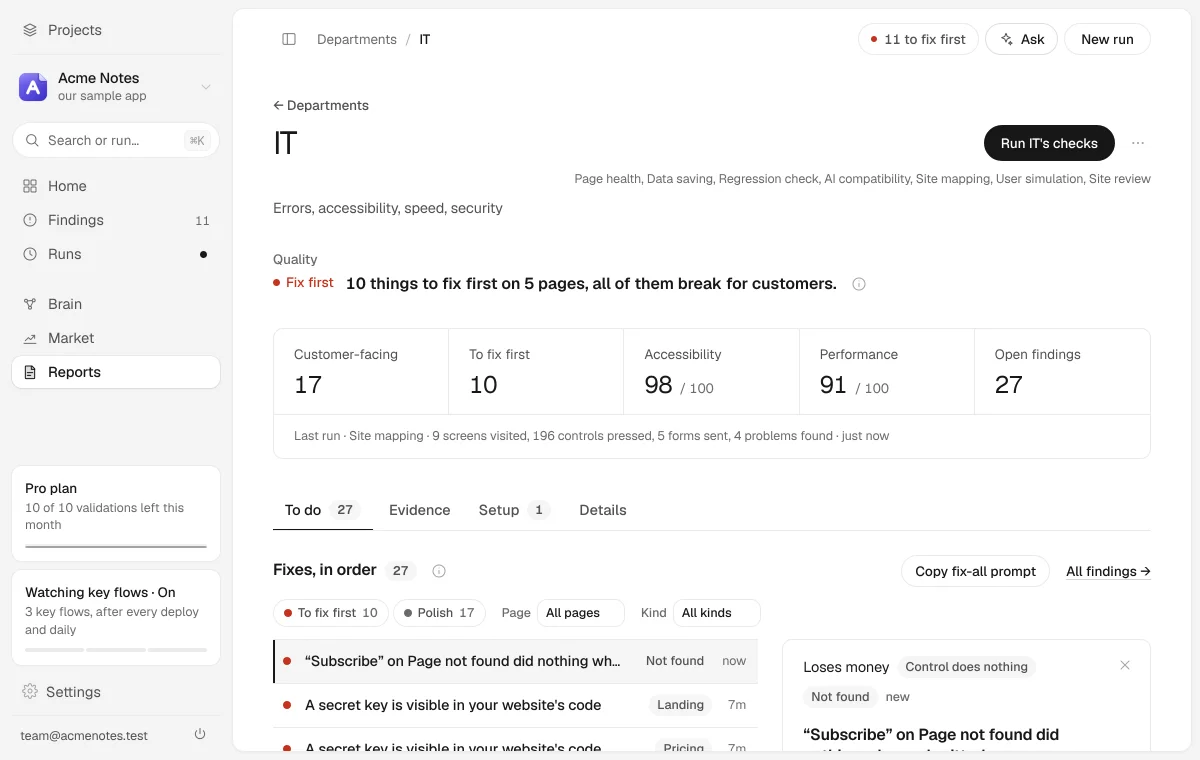
- IT gets most of them. Its page opens with one line on whether the product works for customers, then the accessibility and performance scores.
- Finance gets the gaps on the way to money, and Marketing gets how a shared link to your product looks.
- Runs keeps each run’s own report: both scores, how fast every page loaded on each device, and anything that could not be measured, with the reason.
What it checks
- Speed. How long the main content takes to appear (LCP), how much the layout jumps while it loads (CLS), how quickly the server answers (TTFB), how heavy the page is and how many elements it holds, each rated good, needs work or poor. Also images shipped far larger than the space they fill, and a front page that loads a large number of third-party scripts.
- Accessibility. The rules of axe-core, an open-source accessibility engine, plus checks of its own: tap targets too small on a phone, pages that scroll sideways on a phone, keyboard traps, and dialogs the Escape key cannot close.
- Things that are broken. Buttons and links that do nothing when pressed, forms that cannot be submitted, links that lead nowhere, images and scripts that fail to load, JavaScript errors, a not-found page that crashes, a loading message that never finishes, a save that says it saved and did not, and a back button that does not go back.
- Security basics. A server-side key served to the browser, a password sent over plain http, a page behind your sign-in that opens for anyone with the link, session cookies missing a protective flag, libraries with known vulnerabilities, and tracking cookies set before anyone agrees to them.
- The way to money. A price with nothing on the page that can buy it, no way to sign up, no way back in after a forgotten password, and no way to reach a person. These go to Finance.
- A shared link. A page with no title, description or preview image, so a link to it shows no preview in a chat. This goes to Marketing.
Buttons that do nothing
A button that looks fine but does nothing passes every accessibility and speed rule, because its markup is valid. To find one, Page health presses each control on a fresh copy of the page and watches what happens. It skips anything that looks like a payment or a deletion, submits no form along the way, and follows no link off your site.
On Acme Notes, our sample app, the newsletter form at the foot of the front page and the pricing page has a Company field that is hidden as a spam trap and was left required. A visitor fills in every field they can see, presses Subscribe, and nothing happens. The browser writes “An invalid form control is not focusable” to its developer console, which visitors do not see. Page health files it as a form that cannot be submitted at all, and marks it ship-blocking.
Running it on its own
Open New run, then Change what runs, and pick Page health under A single check.
- Which pages: the ones in Settings, Pages, which nth Labs finds by scanning your site. If the scan misses a page, you can list the pages by hand there instead.
- Which devices: desktop and phone, unless you change the default in Settings, Runs.
- Pages behind your sign-in: measured signed in, with the test account from Settings, Sign-in. Without one, those pages are skipped and the report says why. See Testing behind a login.
What it cannot tell you
- A clean automated accessibility result is not the same as meeting the standard. A machine can check only some of the rules, so a pass with a keyboard and a screen reader is still worth doing.
- Speed is a measurement taken on our machine, not what your visitors feel on their own phones and connections.
- The security checks cover what the product hands a visitor’s browser. This is not a penetration test.
- A check that could not run on a page says so rather than passing quietly. Look for what could not be measured in the run’s report and on the IT page.
In CI
The nth Labs GitHub Action runs Page health against your preview deploy by default, needs no key, and fails the job when a change brings in a new ship-blocker. See Running it in CI.
From the command line
If you run nth Labs yourself from the repository:
node cli.cjs vitals                            # every page, desktop and phone
node cli.cjs vitals --devices mobile           # the phone pass only
node cli.cjs vitals --scenarios pricing,login  # only these pages
node cli.cjs watch                             # again whenever you save a file
--scenarios narrows the run to pages already on your list; it cannot add one.
watch re-runs Page health on the pages a saved file can reach. It stays free,
so you can leave it running on every save.